Durabook, the global rugged mobile solutions brand owned by Twinhead International Corporation, today announces the European launch of its high performance, lightweight 11.6 inch touchscreen tablet. The new R11L is built to boost productivity and efficiency for workers in retail, logistics and hospitality, as well as for applications like workforce management, asset/inventory management, mobile POS, […]
Durabook showcases its latest product lineup of rugged laptops and tablets at the Automotive Testing Expo in Stuttgart, Germany. Visit us at the Stuttgart showgrounds in Hall 10, Stand 1042 between May 21st and May 23rd to experience them first hand. This event is the world’s largest trade fair for automotive test, evaluation and quality […]
At just 20mm thin and 1.2kg, the 11.6” R11 ranks as the world’s most compact tablet in its class — perfect for pros in the field Taipei, February 26, 2019 — Durabook, the global brand owned by Twinhead International Corporation, has upgraded its fully rugged R11 tablet. The acclaimed device now features an Intel® 8th […]
We are proud to announce that Durabook R13S is the official winner of the Rugged Notebook category of U.S. Air Force Client Computing Solutions(CCS-2) for fiscal year 2018 (January 1 – June 30). Against intense competition, Durabook was chosen for great product design, superior built quality and uncompromised service. We now stand ready to work […]
We are proud to announce that Durabook R13S was the product of choice in the February 2018 issue of The Police Chief magazine. The Police Chief magazine is the official monthly publication of the International Association of Chiefs of Police (IACP). It is best known for high quality contents from seasoned law enforcement professionals and […]
We are proud to share with you that Durabook R11 has been officially chosen by American Security Today as the best rugged tablet for Gold ASTORS Award 2017. American Security Today (AST) focuses on the latest development in physical/IT technology for homeland security and public safety application. The review of AST was conducted by their […]
We are pleased to announce that the option of upgrading to latest Intel® CPU Kaby Lake is officially available to DURABOOK’s semi-rugged laptop, SA14S, and full-rugged laptop, R13S. Starting from 2017 Q4, you may select Intel® Skylake-U or Kaby Lake-U i-Core CPU pending on the requirement. Based on the same reliable 14 nanometer process, Kaby […]
We are pleased to introduce the latest iteration of Durabook’s popular 13.3” fully-rugged laptop PC, R13S. Significant upgrades have been made to R13S which now comes with the latest Intel® Skylake-U i-Core CPU and Dual DDR4 system memory for un-paralleled performance. R13S sports the same reliable IP65 rating while being MIL-STD 810G and MIL-STD 461F […]
We are pleased to introduce the latest iteration of Durabook’s popular SA14 semi-rugged laptop, SA14S. Significant upgrades have been made to SA14S which now comes with the latest Intel® Skylake-U i-Core CPU and Dual DDR4 system memory to boost performance. SA14S also provides additional configuration options to cover wide spectrum of requirements.SA14S sports the same […]
To provide the best experiences, we use technologies like cookies to store and/or access device information. Consenting to these technologies will allow us to process data such as browsing behaviour or unique IDs on this site. Not consenting or withdrawing consent, may adversely affect certain features and functions.
Functional
Always active
The technical storage or access is strictly necessary for the legitimate purpose of enabling the use of a specific service explicitly requested by the subscriber or user, or for the sole purpose of carrying out the transmission of a communication over an electronic communications network.
Preferences
The technical storage or access is necessary for the legitimate purpose of storing preferences that are not requested by the subscriber or user.
Statistics
The technical storage or access that is used exclusively for statistical purposes.The technical storage or access that is used exclusively for anonymous statistical purposes. Without a subpoena, voluntary compliance on the part of your Internet Service Provider, or additional records from a third party, information stored or retrieved for this purpose alone cannot usually be used to identify you.
Marketing
The technical storage or access is required to create user profiles to send advertising, or to track the user on a website or across several websites for similar marketing purposes.
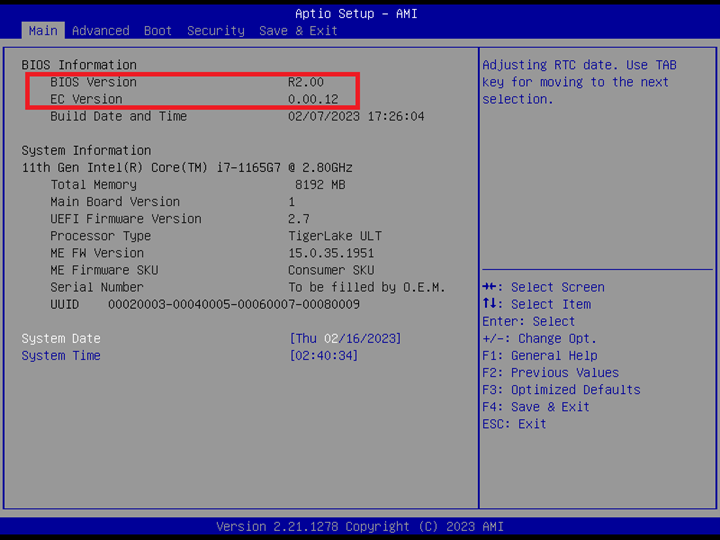
Перед загрузкой файла обновления BIOS всегда проверяйте версию BIOS и убеждайтесь, что загружаете файл BIOS для надлежащей модели материнской платы. Для проверки версии BIOS после включения устройства перейдите в настройки BIOS нажатием клавиши Delete на клавиатуре. В случае с планшетом нажмите виртуальную клавишу Setup (Настройка) в верхнем правом углу сенсорного экрана.
Для официальной загрузки BIOS, если у вас установлена система BIOS версии R1.XX, вам
необходимо загрузить ту же версию R1.XX BIOS для семейства устройств.